Merge Your Sync2Cal Calendars Into One Feed
Updated
Sync2Cal publishes one calendar per thing you follow. That is the right way to build a catalogue, and it means anyone following a few things ends up with a few separate subscriptions in their calendar app, each with its own colour and its own on/off switch. iCal Merge combines them into one feed, so everything you follow arrives as a single subscription.
It is not just TV and sport
Sync2Cal's catalogue runs past the obvious. Alongside teams, leagues, TV shows and movie releases, they publish calendars for holidays and observances, book releases, music, gaming, finance, space launches, trip planning and local events. Anything with a schedule is fair game, and the merge works the same way whatever mix you pick. A single feed can carry your football club, a show you follow, next month's album releases and a launch window.
Step 1: Copy each calendar's link
On Sync2Cal, open what you want to follow and press Sync to Calendar. The link only carries real events once the calendar is synced. An unsynced link serves a single placeholder event that says "Unsynced", which is the usual reason a merged calendar looks empty.
If a calendar splits into strands you don't all follow, use Filter events first. WWE, for example, offers Raw, SmackDown, NXT and Premium Live Events separately. The filter travels with the link you are about to copy, so set it before you sync.
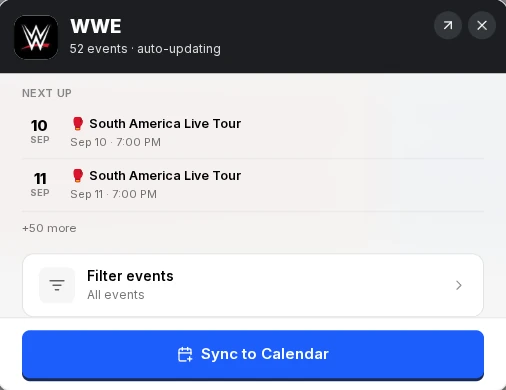
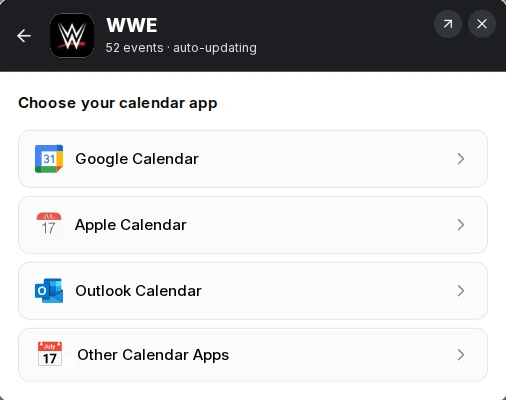
Sync2Cal then asks which calendar app you use. Pick Other Calendar Apps. Google and Outlook lead with a Connect button, which lets Sync2Cal write the calendar straight into one it creates for you. That is the better route if you only want one calendar in one app, but it hands you no URL, so there is nothing to merge. Both also hide a "Use calendar link" option further down that gives you the same URL as Other Calendar Apps.
That opens "Add to your calendar app manually". Step 1 there is Copy the calendar URL. Press Copy and ignore the rest of the steps, which are about pasting into a calendar app. You are pasting into iCal Merge instead.
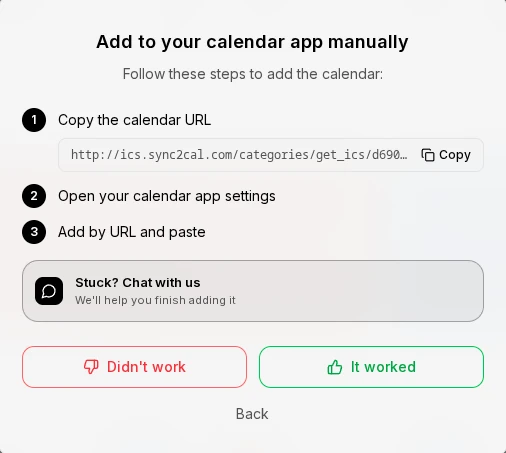
Repeat that for everything you follow. The copied URL carries your own Sync2Cal subscription id rather than the calendar's, so each one has to come from its own Sync and Copy. Editing the id by hand will not work. Sync2Cal screens here are from September 2026 and their app may have moved on.
New to these links? The iCal feed explainer covers what an ICS URL is and why subscribing beats a one-time import.
Step 2: Add each link as a source
Create a calendar in iCal Merge and paste each link in as a source. Name the source after what it follows. Every event is prefixed with that name, so an entry reads "Formula 1: Miami GP" rather than a bare event title with no context.
Add Calendar Source
| Source Name | Calendar Title | Actions |
|---|---|---|
| WWE | Raw, SmackDown & premium events | |
| Formula 1 | 2026 race calendar | |
| Severance | Apple TV+ episode air dates |
Step 3: Subscribe once
iCal Merge gives you one feed URL. Subscribe to it in Google, Apple or Outlook and everything you follow shows up in your normal calendar. Add another Sync2Cal calendar later and it appears in the same feed. There is nothing to re-subscribe to. The merged calendar is read-only: it mirrors what Sync2Cal publishes, so you cannot edit an event from your calendar app, and nothing you do there writes back.
iCal Merge re-fetches each Sync2Cal feed hourly on the free plan and every 15 minutes on Pro. Your calendar app then polls the merged feed on its own schedule, and that is usually the slower half. Apple checks roughly hourly, Google can take several hours.
Mix them with the rest of your calendars
A merged calendar does not have to be all Sync2Cal. The same feed can hold your work calendar, a family calendar and a couple of Sync2Cal subscriptions side by side, which is how you spot that the race clashes with a school run. See how to see all your calendars in one place for that side of it.
How many you can merge, and what it costs
A free iCal Merge calendar holds 3 sources. Pro holds 100 sources per calendar across 10 calendars, which is where a real following list lands. Sync2Cal is a separate subscription: a 7-day free trial, then $3.33 a month billed annually at $39.99, or $4.99 month to month, at the time of writing. You need one to keep calendars synced, whether or not you merge them afterwards.
Put it on a wall display
The merged result is one standard calendar feed, so it drops into a smart display like DakBoard or Skylight without wiring up a feed per calendar. See how to set up a calendar wall display for the per-device steps.
Frequently asked questions
Why is my merged Sync2Cal calendar empty?
Almost always because the calendar is not synced in your Sync2Cal account, or the trial there has lapsed. An unsynced link serves one placeholder event called "Unsynced" instead of real events. Press Sync to Calendar on it, then re-check the feed in iCal Merge.
I pressed Connect Google Calendar on Sync2Cal. Can I still merge it?
Yes, but that route gives you no URL to copy. Go back to the calendar, choose Other Calendar Apps instead, and copy the calendar URL from there. Sync2Cal also offers "Use calendar link" underneath the Google and Outlook options, which gives you the same URL.
Which Sync2Cal calendars can I merge?
Any of them. Teams and leagues, TV shows and movie releases, holidays, book and music releases, gaming, finance, space launches and local events all publish the same kind of ICS link, and they merge the same way. You can mix categories freely in one feed.
Can I merge Sync2Cal calendars with my own calendars?
Yes. A merged calendar takes any ICS feed, so your Google or Outlook calendar can sit in the same feed as your Sync2Cal subscriptions. That is the point of merging: one place to see whether a fixture clashes with something real.
What does this cost?
Merging is free on iCal Merge: a free calendar takes 3 sources with no credit card, and Pro adds more calendars, 100 sources per calendar and faster refresh. Sync2Cal is billed separately: a 7-day trial, then $39.99 a year or $4.99 a month at the time of writing.
Related: Follow all your teams in one calendar · What is an iCal feed · All guides